
Download Mini Key Log – Secure, Stealthy Computer Monitoring Tool for Windows
Mini Key Log is a powerful, discreet monitoring software designed for users who need to track computer activity without detection. Whether you're a parent safeguarding your child’s online experience, an employer ensuring productivity, or an individual monitoring your own device, Mini Key Log offers comprehensive logging of keystrokes, websites visited, screenshots, file operations, and more. With support for Windows 7, 8, 10, and 11, this tool runs silently in the background, capturing every action while remaining undetectable.
The software is available as a free trial, allowing you to test its features before upgrading to the full version. Its intuitive interface and minimal system impact make it ideal for both beginners and advanced users. With robust privacy controls and secure data storage, Mini Key Log ensures your monitoring efforts remain confidential and effective.
Advanced Monitoring Features for Complete Activity Tracking
Mini Key Log stands out in the crowded field of monitoring software thanks to its extensive feature set that goes far beyond basic keystroke logging. The tool captures a comprehensive range of user activities, providing a complete digital footprint of every action taken on the monitored computer. At its core, Mini Key Log records every keystroke, including sensitive data like passwords and login credentials, which is especially useful for parents wanting to prevent exposure to inappropriate content or employers ensuring data security. Beyond text input, the software logs all visited websites, including URLs, timestamps, and browsing duration, giving a detailed overview of online behavior.
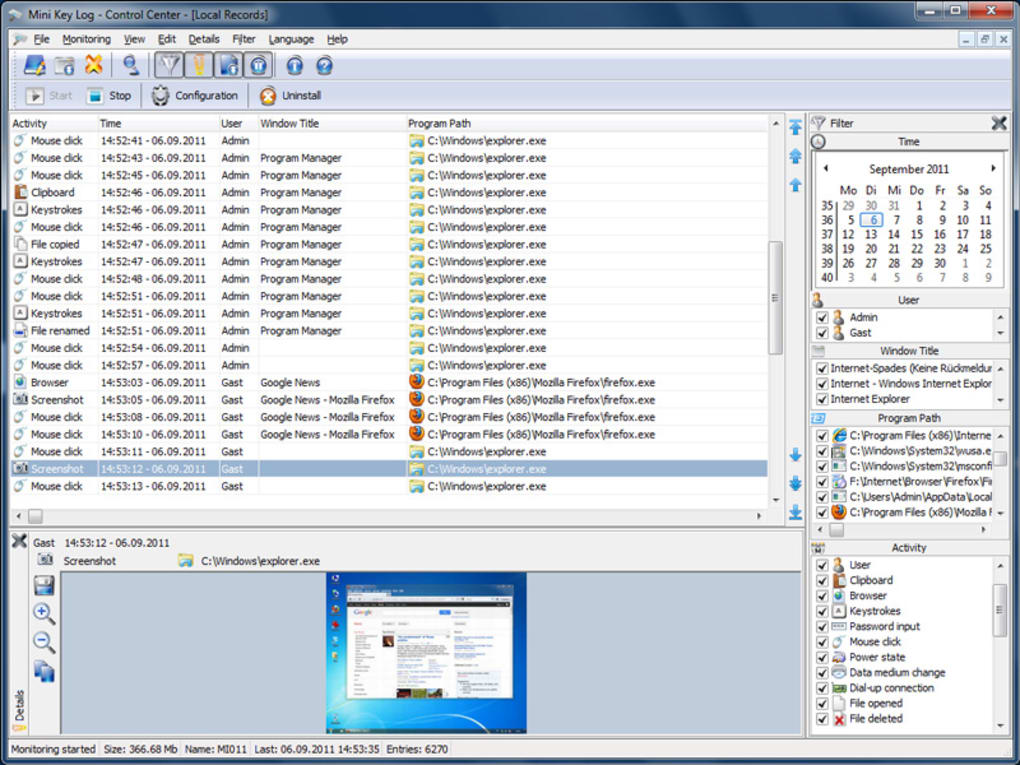
What truly sets Mini Key Log apart is its ability to capture screenshots at regular intervals or triggered by specific events—such as opening a new browser tab or typing in a password field. These visual records provide undeniable proof of activity and help clarify ambiguous actions. Additionally, the software tracks file operations like creation, deletion, and renaming, making it ideal for monitoring sensitive data handling. It also logs mouse clicks, printer and scanner usage, modem activity, and even the insertion of removable media such as USB drives, which is critical for preventing data leaks.
Other notable features include user login/logout tracking, clipboard monitoring, and system power state changes. This level of detail ensures that no digital footprint is left unrecorded. All data is stored securely in encrypted logs, accessible only through a password-protected interface. The real-time dashboard allows users to view logs instantly, and the export function supports multiple formats like PDF and CSV for easy sharing or archiving. With such a wide range of monitoring capabilities, Mini Key Log delivers unmatched visibility into computer usage—without compromising performance or security.
Easy Installation, Seamless Operation, and Cross-Platform Support
One of the most impressive aspects of Mini Key Log is its user-friendly installation and setup process. Designed with both novice and experienced users in mind, the software installs in under a minute with minimal configuration required. After downloading the installer from the official website, simply run the file and follow the on-screen prompts. During installation, users can choose between a standard setup (recommended for most) or a custom setup for advanced configuration options. Once installed, Mini Key Log runs in the background with no visible icons or notifications—ensuring it remains undetected by the monitored user.
The software is compatible with Windows 7, 8, 10, and 11, covering the vast majority of desktop and laptop systems in use today. It operates efficiently without consuming excessive CPU or RAM, making it suitable for older machines as well. The lightweight design ensures that monitoring doesn’t slow down daily tasks like web browsing, video editing, or gaming. For users managing multiple devices, the same license can be used across several Windows systems, offering flexibility for home or small business environments.
Using Mini Key Log is equally straightforward. After installation, launch the control panel using a predefined password or hotkey. From there, you can view real-time logs, adjust monitoring settings, export data, and schedule automatic backups.
The software supports automatic updates, ensuring you always have the latest security patches and feature enhancements. Whether you're checking for suspicious activity or reviewing daily usage patterns, the clean, intuitive interface makes navigation effortless. With its seamless integration into everyday workflows, Mini Key Log becomes a reliable, invisible guardian of digital activity.
Pros and Cons: Is Mini Key Log Right for You?
Like any software, Mini Key Log has strengths and limitations that should be considered before making a decision. Here’s a balanced look at what makes this tool stand out—and where it might fall short.
- Pros:
- Comprehensive monitoring of keystrokes, websites, screenshots, and file operations
- Undetectable operation with no visible icons or alerts
- Supports Windows 7 through 11 with minimal system impact
- Encrypted log storage ensures data privacy and security
- Free trial version allows full feature testing before purchase
- Intuitive control panel with real-time log access and export options
- Automatic updates keep the software secure and up-to-date
- Cons:
- Only available for Windows—no Mac, iOS, or Android support
- Advanced features require the paid version; free trial has limited functionality
- May raise privacy concerns if used without proper disclosure in shared environments
- Customer support response time can be inconsistent
- Requires a password to access logs—forgetting it may result in data loss
Overall, Mini Key Log excels in stealth, functionality, and ease of use. Its ability to monitor virtually every digital action without interference makes it a top choice for parents, employers, and individuals focused on digital security. However, the lack of cross-platform support and the need for clear ethical use are important considerations. If you're using it on a Windows machine and understand the legal and ethical boundaries, Mini Key Log is a powerful, reliable tool that delivers on its promises.
Frequently Asked Questions (FAQ)
Is Mini Key Log legal to use?
Yes, Mini Key Log is legal when used responsibly and in compliance with local laws. It is intended for monitoring devices you own or have explicit permission to monitor. For example, parents can use it to protect children online, and employers can monitor company-owned devices for productivity and security. Using it on someone else’s private device without consent may violate privacy laws.
Can Mini Key Log be detected by antivirus software?
Mini Key Log is designed to operate stealthily and is not flagged by most standard antivirus programs. However, some advanced security software may detect it due to its background monitoring nature. To avoid issues, ensure you’re using the software on devices you own and consider whitelisting the application in your antivirus settings.
How often are screenshots captured?
Screenshots are captured based on your settings. You can configure the software to take screenshots at regular intervals (e.g., every 5 minutes) or trigger them on specific events like opening a new browser window or typing in a password field. This flexibility ensures you get the visual evidence you need without overwhelming storage.
Is there a mobile version of Mini Key Log?
Currently, Mini Key Log is only available for Windows operating systems. There is no official version for Mac, iOS, or Android. If you need monitoring across multiple platforms, you may need to consider alternative tools or use different solutions for each device.
Can I access logs remotely?
Yes, Mini Key Log allows remote access to logs through a secure web portal. After enabling remote access in the settings, you can log in from any device with internet access to view real-time activity, export reports, and manage monitoring preferences. This feature is especially useful for employers managing remote teams or parents checking in from work.
Final Verdict: A Reliable Choice for Discreet Monitoring
Mini Key Log delivers on its promise of powerful, invisible computer monitoring. With its wide range of features—including keystroke logging, screenshot capture, file tracking, and remote access—it offers unmatched visibility into digital activity on Windows systems. The free trial lets users test the software risk-free, and the intuitive interface ensures a smooth experience from setup to daily use. While it lacks support for Mac and mobile platforms, its performance, stealth, and reliability make it a top contender for Windows users.
Whether you're a parent concerned about online safety, an employer monitoring work devices, or an individual protecting sensitive data, Mini Key Log provides the tools you need. Just remember to use it ethically and within legal boundaries. If you're looking for a secure, easy-to-use monitoring solution for Windows, Mini Key Log is a smart, dependable choice.
Download Mini Key Log today and take full control of your digital environment—secure, discreet, and effective.







